
DynID is the integrated logon credentials that allows customers to: (1) access both Managed DNS and Email with a single logon, (2) create and manage their own support tickets, (3) reset passwords online, and (4) manage credit cards for billing.
In addition to a single DynID, Dyn accounts still benefit from a 2-Factor Authentication process for increased account security.
DynID Help Topics- Creating a Support Ticket - Resetting a Password - Updating Credit Card Information - DynID FAQs
2FA Help Topics- 2FA Using SMS Text Messaging - 2FA Using A Mobile App - 2FA Frequently Asked Questions - 2-Factor Authentication
| 1. From the Dashboard, find your user name.2. Click the drop-down arrow open your account information. 3. Select Logout from the menu. | 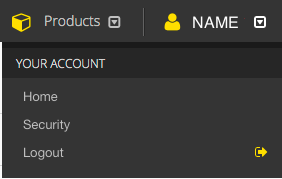 |