
Registrants may decide that obscuring the WHOIS details of their domain name is in their best interests for privacy. Dyn offers a Secret Registration service which does just that.
Enabling Secret Registration
If you purchased a domain name and did not opt for the Secret Registration at the time of your transaction, you can add it at any time by following these steps:
Note: Not all TLDs that Dyn provides registration services for allow Secret Registration. If the link to enable the service does not appear, then Secret Registration is not available.
| 1. Log into your Dyn account. | 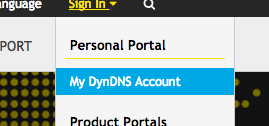 |
| 2. Select My Zones/Domains from the My Services column. | 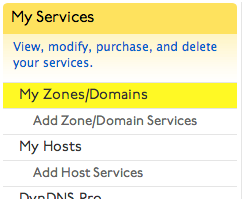 |
| 3. Click on the name of the domain for which you wish to enable Secret Registration. | 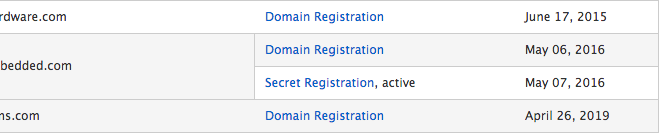 |
| 4. Locate the link to enable the service. Note: The link to enable the service will appear only when Secret Registration is available for this TLD. | 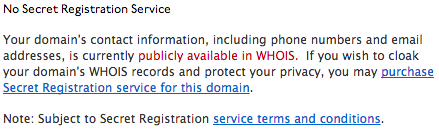 |
| 5. Proceed to checkout with your new Secret Registration service. Note: If you have less than a year left on your domain registration, a pro-rated service will be added to your cart in addition to a year of the service to bring the expiration dates into sync. | 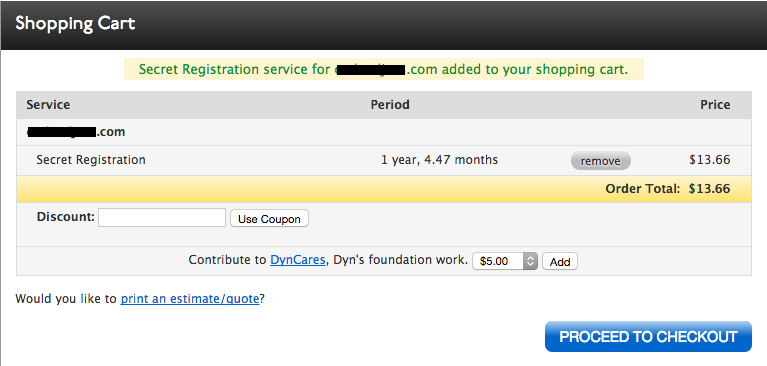 |
Temporarily Disabling Secret Registration
If you need to temporarily suspend your Secret Registration service, please follow these steps:
| 1. Log into your Dyn account. | |
| 2. Select My Zones/Domains from the My Services column. | |
| 3. Click on the name of the domain for which you wish to disable Secret Registration. | |
| 4. Locate the link to disable the service. | 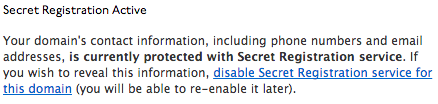 |
| Your service will be disabled at this point. To re-enable your service, follow these steps and the link will change to re-enable the service instead. | 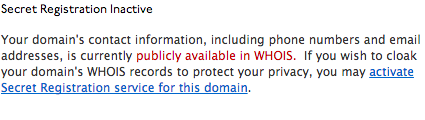 |